
!
- Understand how webpages are built with tags
- Understand how to modify a basic webpage
- Be able to modify an HTML webpage and add content
- Be able to save and preview a webpage
- Be able to look up HTML tags
-
1
In one or two sentences, explain the different between viewing the source of a page and the inspector.
Your first webpage
Your first webpage is fairly straightforward to build. You do not need anything other than a simple text editor such as Notepad to create a webpage.
Write the following code into Notepad++, Visual Studio Code or Brackets.
HTML
<!DOCTYPE html>
<html>
  <head>
    <title></title>
  </head>
  <body>
  </body>
</html>
Creating a template webpage
The code shown previously is sometimes referred to as the basic structure of a webpage or the basic HTML page. This is because all pages start with this structure.
Below is a simple template for a webpage you'll be editing.
HTML
<!DOCTYPE html>
<html>
  <head>
    <title>About [name]</title>
  </head>
  <body>
  <h1>[Name]</h1>
    <p>My name is...</p>
    <ul>
      <li>My favourite <b>subject<\b> is...</li>
      <li>My favourite <b>food<\b> is...</li>
      <li>My favourite <b>colour<\b> is...</li>
    </ul>
  </body>
</html>
-
1
Add in the missing information to the template page (download above). For example, where it says
My name is..., Mr Balfour could change it toMy name is Mr Balfour). After that open it with Google Chrome to ensure that the page is working correctly.Enter your code below:
-
2
Describe what your webpage looks like once you have viewed it in a browser. What does the <h1> look like? What does the <li> do? How has something been made bold?
-
3
What does the
<title>do on the website?
Tags
What are tags?
Tags are an important part of HTML that allows the developer to specify what the webpage needs to have in it.
There are hundreds of tags available. And, since HTML is what is called a living standard (this means it is always getting updates), there are more being added all the time.
Developers sometimes need to look up how to write specific tags and it's not expected that even the most experienced developers or even people who create the tags can remember everything about them at all times. There are many useful websites that can help with this, giving you the code you need to write the HTML. One such website is w3schools.com.
Tags are fairly straightforward, for most tags, there is an opening and closing tag. Inside both tags, there is the type of tag that will be used inside.
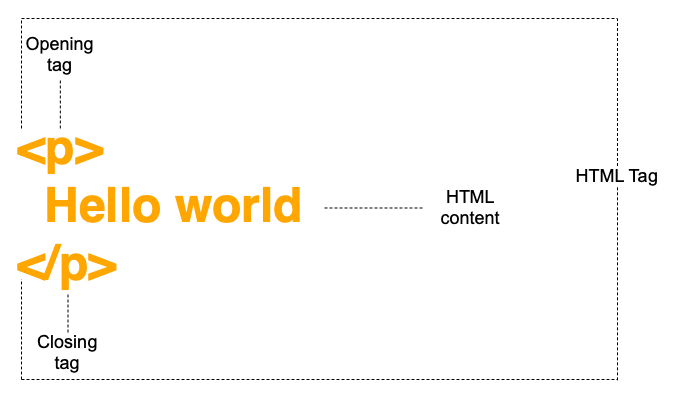
Notice with the closing tag that the type of tag is preceded by a forward slash. Some tags such as the <img> tag or the <link> tag do not have closing tags and are known as self-closing tags.
-
1
Look up the following tags and write the name or a short description of the tag below.
<p>
<img>
<br>
<a>
<code>
<!DOCTYPE html>
<h1>
<h3>
<body>
<head>
<title>
After you have found each of these, test them out on your page.
Download the profile.html page from below. This will become your main profile page.
Once you have answered each of the questions, remember to save this worksheet by pressing the Save button.