

Tesla, who just so happen to be one of my favourite companies, are unveiling their latest electric car - the Model 3. I am very excited by this mainly from a technology perspective but also from an environmental point of view.
Teslas current lineup of cars are absolutely stunning, and it may seem like a dream right now, but I am very interested in the range and some time in the future I would love to own one (it will likely have changed by the time I get around to looking at buying one).
Tesla are a fantastic company who build things to an outstanding degree as I noticed when I was in one of the Tesla Stores. They also innovate way more than other car manufacturers, so kudos to them.
I am excited by the Model 3 however as it will have a lower price point than the other models and it could possibly be the next car my parents buy. The future is electric and I'm hoping the Model 3 proves this further.
The latest version of BalfBlog is everything a perfect blog system should be - lightweight, compact and easy to update. I'm very happy to say that the latest version, which I will put up on my website later today, is all of these things.
Equally as important, the new version of BalfBlog creates SEO friendly URLs. For instance, my latest post on my blog (prior to this one, of course) now has the following SEO friendly URL, automatically generated: http://stihlpromo.online/blog/posts/one-weird-issue-with-older-html-based-bgcolor%3C/a%3E%3C/p%3E
SEO URLs-friendly URLs
Since the update was applied to my personal blog, my SEO rating has gone up. URLs are based on the title of the post so they become more easy to read and identify what the page at the end of the URL actually is. Google likes this.
Categories can also be accessed in a more friendly manner:
http://stihlpromo.online/blog/categories/apple%20everything%3C/a%3E%3C/p%3E
And finally, tags can be accessed through a much more elegant way too:
http://stihlpromo.online/blog/tag/javascript%3C/a%3E%3C/p%3E
Also, BalfBlog now uses prepared statements for speed, security and ease of updating.
In the old days, before CSS, background colours were set using the bgcolor attribute as below:
<html bgcolor="rgb(255, 0, 0)">
</html>
But since this is quite an old way of doing things and not used often nowadays, you'll probably find it has a lack of support in some newer browsers like Google's Chrome. I came across this issue when I was trying to make the background red by using rgba(255, 0, 0) which would normally produce red and does in other browsers, but in Google's Chrome browser it produces a totally different colour. I believe this is because Google did not spend much time working on support for this older attribute that should be banished from HTML5 altogether. Below is a sample that may or may not do anything at all:
Have you experienced this issue where the colour value represents different colours on different browsers? If so let me know by commenting below.
Five years after the last update to Diablo II, the fans get an update that makes this amazing game compatible with Windows 10 and Mac OS X 10.10 and 10.11. This came as a shock to me and hundreds of other fans across the world who adore this game as much as I do.
The game which is 16 years old has long had problems with not working on modern operating systems, so this update is a hugely welcomed update. This really shows the commitment that Blizzard have to their fanbase more than anything, and what a commitment this is too.
I have been working quite a lot recently on my latest project, ClickIt. ClickIt is a web development tool using the new HTML5 drag and drop standards. It has been working fine with all browsers until very recently I discovered it had an issue with both Mozilla Firefox and Microsoft Edge. I have in the past stated my dislike for Firefox after it made my life much harder in one of my courseworks last semester and now my anger continues.
Chrome, Safari and Opera cover a reasonably large base of users but for full compatibability, I'm going out of my way to try and fix an issue which I don't even know what it is. The original problem occured when I used the W3 standard for drag and drop and did this:
function DragBlock(ev, mode) {
	setData(ev, "mode", mode);
	setData(ev, "text", ev.target.innerText);
	setData(ev, "style", ev.target.getAttribute("class"));
}
function setData(ev, x, v){
	ev.originalEvent.dataTransfer.setData(x, v);
}
The problem however is that when I then try to retrieve this information, none of it exists. It does in Chrome and Safari, but not in Firefox or Edge. If I find a solution I will post it here.
ev.target.innerText function. This function is not supported in Edge or Firefox, but is in Chrome and Safari. So there you have it. My problem is fixed.setData function is actually not the name of the value but the type. For some reason, Chrome and Safari accept this as the name anyway and transform this to a map from the name to the value (or in this case x -> v). Instead of messing about with this, my solution, which is somewhat crude, is to use a global variable which in turn is a map from x -> v. Since I put these in functions, my functions were simply changed to modify this global variable upon request and retrieve information back from it. This solution is as I say crude since it relies on the fact there is only one object being transferred. I am most puzzled by the fact that the issue is totally different with Safari and Chrome and that they work this as if it were a map.Whilst I was working on a university project, I started to add some extra functionalities to change the image in a canvas. A lot of this reminded me of my BBCL (Balfour's Business Class Library), which you will probably know was a collection of business made functions written in VB.NET a long time ago (started in 2008). It reminded me specifically of the Painter Pro extensions of this .NET library that I wrote that also contained functions similar to this.
Because of this, I've decided to make these available as a single package JavaScript file. You will soon be able to download this from my website. I plan to bring it all to JavaScript, including unique features such as the I Want It There tool.
So it seems that now the email system I used before for sending emails is now integrated well into BalfBlog 2.0.
This functionality is included in a separate file so users may modify as they wish.
Within the last few weeks I have been working on major improvements to the integration of what is now known as BalfBlog. Version 2.0 was released just 2 days after version 1.1 and was released due to a complete change in the way it works. This allows it to integrate well with any website and requires minimal effort to install. If you follow my blog you'll probably know that I've been posting about this quite a bit.
One of the things about the new BalfBlog and the way in which my website works with this blogging system is the way in which it integrates with my own website. This makes it painless to install and one of the things I've noticed is how easily my website copes with this design.
But it doesn't stop there. ClickIt is my latest website and the main site is nearly finished. One of the features I've wanted to add was a blog. I found just how easy it was to integrate BalfBlog with Bootstrap as well. One change to a file and that's it. Ready to go. By the end of June this year, I will officially announce the finished version of BalfBlog, until then feel free to get in touch with me and arrange to get a copy of BalfBlog version 2.0b.
I am proud to say that BalfBlog 2.0, the biggest change since the original release of the open designed blog, is now finished. The following list explains every major change applied to BalfBlog 2.0:
- TinyMCE 4.0, the latest, much flatter looking version of TinyMCE.
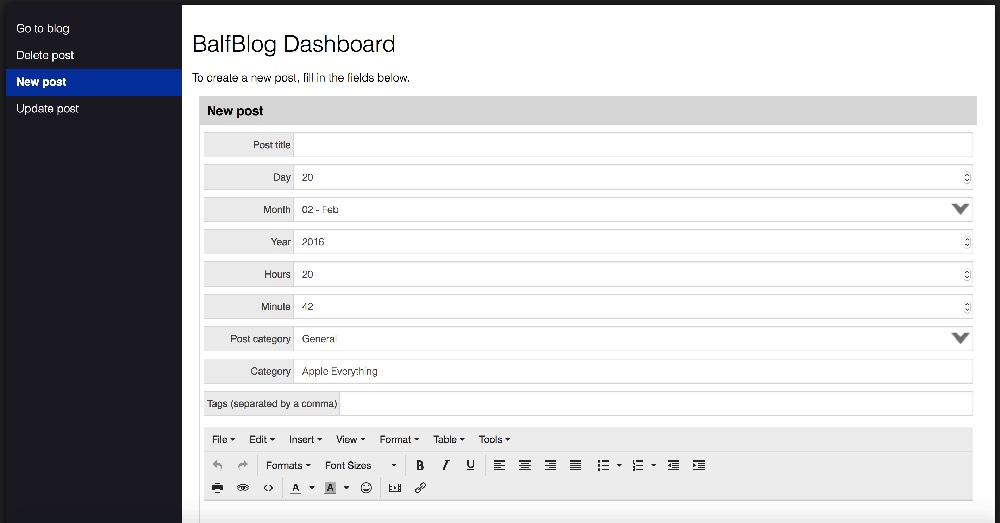
- Removes the requirements for a custom blog. Now the backend dashboard of the BalfBlog is entirely unique. There is a screenshot at the end of this post about this. In version 1, the blog backend was powered by your own website. Unfortunately this meant that users needed a lot of knowledge to install BalfBlog. Now BalfBlog requires just 4 user inputs to get it done. I will be uploading a sample blog you can mess about with soon.
- Create user from the interface, finally. A button on the interface of the backend allows you to easily add a user.
- Completely object oriented
- No search box built in, you will need to provide your own. BalfBlog does provide support for a search query being applied to the posts, all you need to do is add the ?qry query string to the end of the URL where the GeneratePosts() call is made.
- Now there are only 13 files required to work with BalfBlog, and no longer is there an admin section.
- Updating is much easier through the fact that only a few files need updated
- Security has been improved since now, provided you are using Apache or Nginx on your server, you can use the .htaccess directives in the directory to protect against direct use. This is provided by default.
For the very first time since buying my 2012 Mac Mini in 2014 I have reformated it with a fresh OS X install. There was no particular reason for this other than wanting a fresh install of OS X with the very minimal install again - too many files on my system were taking up my drive, so it was just time. The system was still running absolutely as it was when I bought it, so it was nothing related to that. Just saying, Macs don't need that kind of reformat anyway.
Anyway, since this is the first reinstall of OS X on that machine, I thought I'd give my configuration script a try. It really is wonderful, and it's really all thanks to my friends Ben and Merlin that it's as good as this.
The script looks like:
ruby -e "$(curl -fsSL https://raw.githubusercontent.com/Homebrew/install/master/install)"
brew install rlwrap
brew install Caskroom/cask/smlnj
brew install Caskroom/cask/osxfuse
brew install sshfs
brew install python
brew install homebrew/x11/swi-prolog
echo "Insert Dropbox path:"
read input_variable

echo "export $DROPBOX=" >> ~.bash_profile
echo "$input_variable" >> ~.bash_profile
if [ ! -d ~/Pictures/Screenshots ]
then
    mkdir ~/Pictures/Screenshots
fi

rm ~/Library/Preferences/com.apple.dock.plist
rm ~/Library/Preferences/com.apple.finder.plist

sudo cp "$DROPBOX/Mac configurator/configuration/com.apple.dock.plist" ~/Library/Preferences/com.apple.dock.plist
sudo cp "$DROPBOX/Mac configurator/configuration/com.apple.finder.plist" ~/Library/Preferences/com.apple.finder.plist
defaults write com.apple.screencapture location ~/Pictures/Screenshots;
killall SystemUIServer
So once I got my Mac up and running and Dropbox installed, I run this script to copy all the necessary files across to their places, which restores my Mac to how it should look (i.e. it makes Finder and the Dock identical across my Macs). I've highlighted line 12 because it is where my Dropbox directory is put into my Bash profile so that I can reference it from any script easily.
By the way, this is not me saying that Bash is beautiful, because the syntax is horrible. All I am saying is it is a pretty powerful little shell scripting language.